
MetaFix AI15 languages

An AI assistant that knows the account.

Built into the trading app, MetaFix AI answers from the trader’s real account data in their own language. It prepares trade actions, and the trader decides when to confirm.
  • Text or voice
  • Trader-confirmed actions
  • Broker-controlled
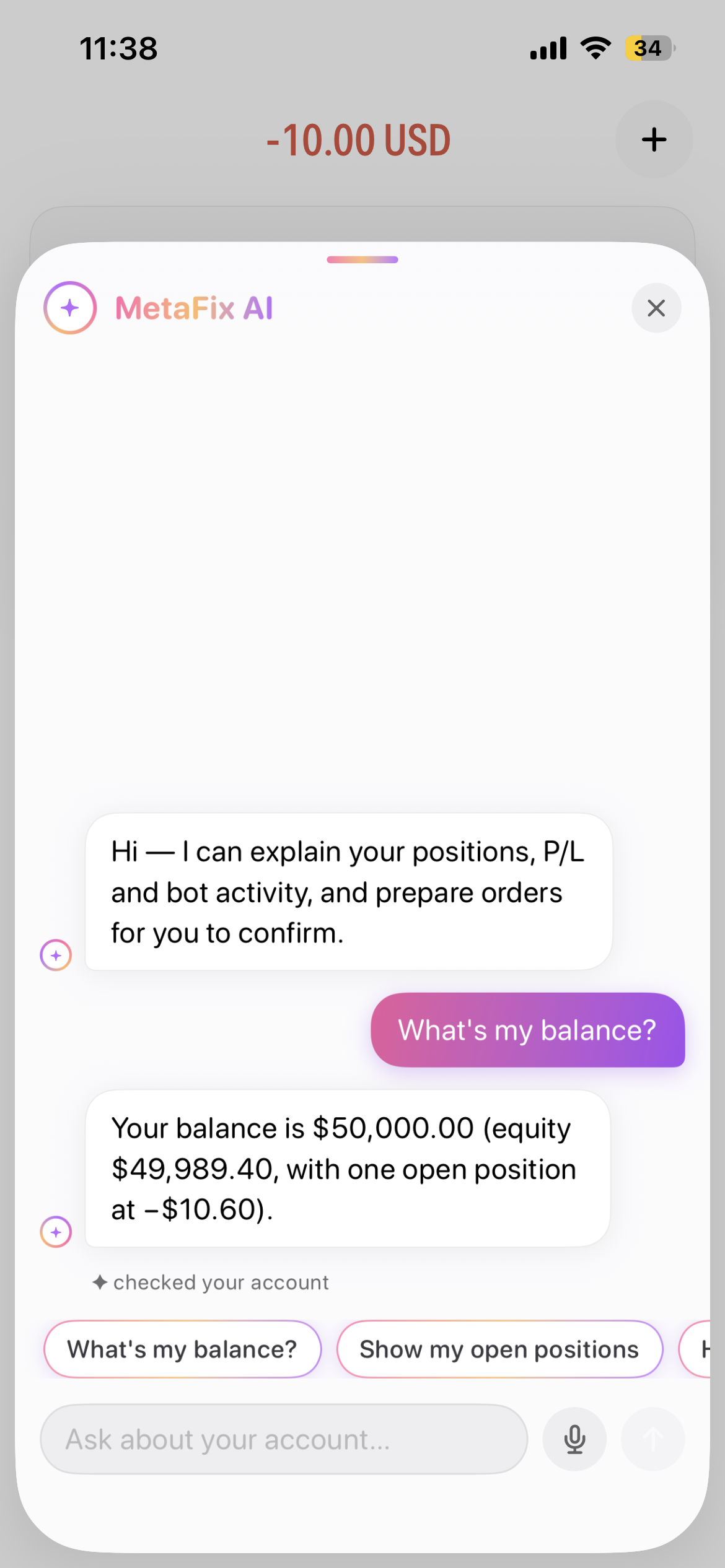
MetaFix AI answering What's my balance? with balance, equity and open position P/L
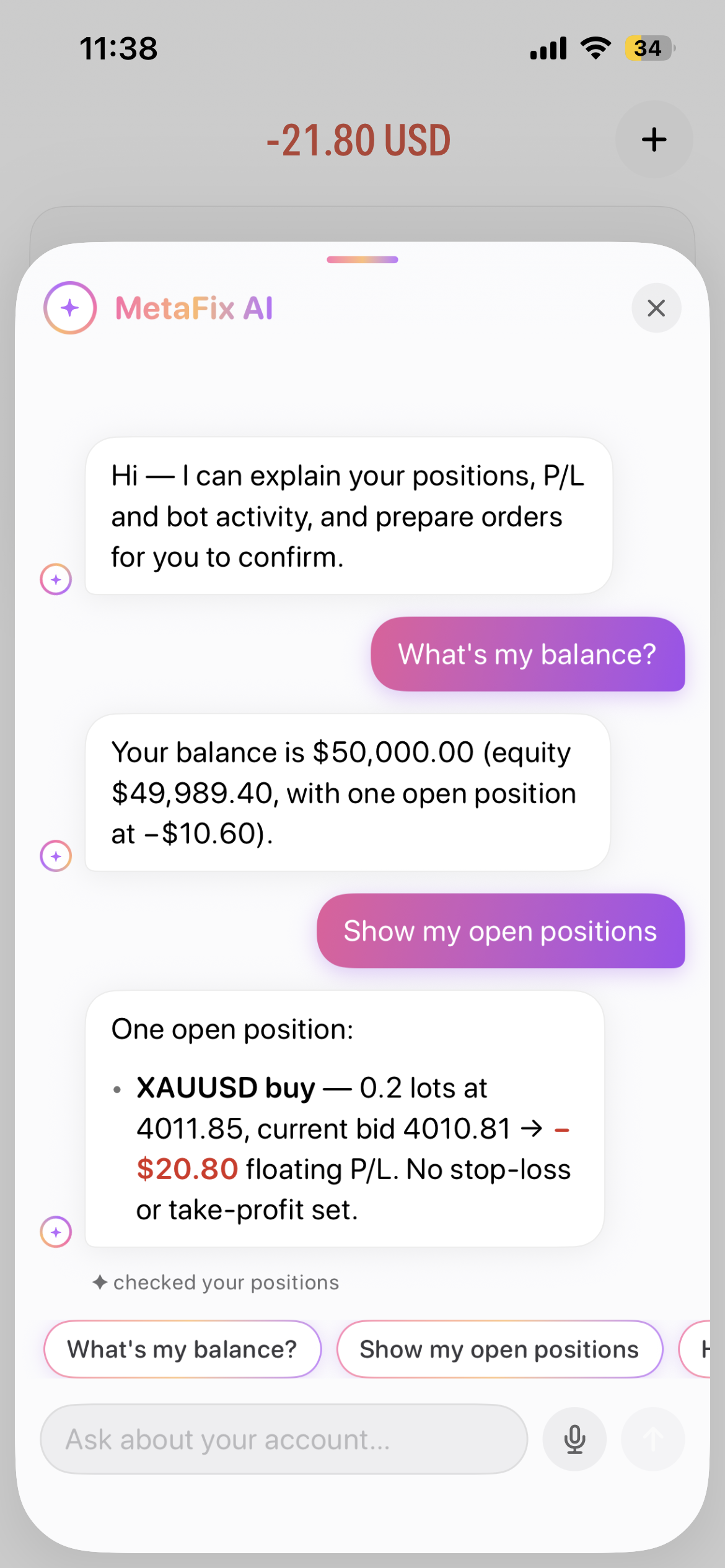
MetaFix AI listing one open XAUUSD buy position with floating P/L and no stop-loss or take-profit set
  • 15Languages, incl. RTL
  • VoiceOr type the question
  • 2AI providers with fallback
  • YouConfirm every action
Five questions from the app

Ask naturally. Understand the account.

From a balance check to bot activity, MetaFix AI turns account information into a clear conversation. Balances, positions, prices, trading history and calendar events are all available.

What's my balance?

01Balance, equity and open P&L

Get the account balance alongside equity and the effect of open positions.

In the conversation

The conversation shows a $50,000.00 balance, $49,989.40 equity and one open position at −$10.60.

Show my open positions

02The details behind every position

See the symbol, buy or sell direction, lot size, entry price, current price and floating P&L, plus whether Stop Loss and Take Profit are set.

In the conversation

The example lists an XAUUSD buy of 0.2 lots at 4011.85, a current bid of 4010.81 and −$20.80 floating P&L, with no Stop Loss or Take Profit set.

How did I do this week?

03Realized results, clearly separated

Review closed-trade activity and realized profit or loss for the week, with open-position results explained separately.

In the conversation

No trades were closed that week: realized P&L is $0.00 across 0 trades. The open XAUUSD position’s floating P&L is not counted as realized.

What's the price of XAUUSD?

04A quote with useful context

Ask for a symbol’s bid, ask, mid-price, spread and tradability in the conversation.

In the conversation

The captured quote is 4011.35 bid / 4011.67 ask, with a 4011.51 mid-price and 0.32 spread. XAUUSD is shown as tradable.

Are my bots running?

05Bot activity at a glance

Check bot deployments and whether they are active, paused or stopped.

In the conversation

In the example account there are no bot deployments, so nothing is active, paused or stopped.

These are captured examples, not current quotes or account results. Values reflect separate moments in the conversation.

More things traders can ask
  • “How many more lots can I open?”Check remaining capacity at current leverage.
  • “Is gold up today?”See live prices at the trader’s own spread.
  • “Was my Stop Loss hit?”Find the answer in the account’s alert inbox.
  • “When is NFP?”Look up calendar events, impact and forecasts.
  • “Download my statement for this month.”Request a secure statement link.
Trader asks What's my balance? and MetaFix AI answers with balance, equity and open position P/L.
Suggested question chips above the Ask about your account field, with a microphone and send button.

Actual app conversation. Account figures shown are examples.

Text, audio & quick questions

Type it. Or say it.

Tap the microphone beside “Ask about your account…” to ask by voice, or type straight into the message field. The assistant responds in all 15 app languages.

  • Speak, review, sendUse the audio input option to speak your question. Review it before sending with the arrow beside the microphone.
  • Start with a suggested questionTap a question chip such as “What’s my balance?” or “Show my open positions”. Scroll the shortcut row to find more everyday questions.
  • See what was checkedStatus notes such as “checked your account”, “checked your positions” and “checked live prices” show the information checked for the response.
  • Understand, then actThe assistant explains positions, P&L and bot activity, and prepares orders for you to confirm. Supported actions remain subject to your confirmation.
Trader confirmation

AI prepares. The trader confirms.

Draft cards support orders, closes, partial closes, Stop Loss and Take Profit changes, and cancellations. The assistant does not execute independently.

  1. 1

    Ask for an action

    The trader describes the action in their own words.

  2. 2

    Review the draft

    Check the prepared action and its details before proceeding.

  3. 3

    Tap to confirm

    The trader authorizes the action. The same checks as a manual order apply.

Information, with clear boundaries.MetaFix AI provides account facts and describes market information. It is designed to inform rather than recommend what a trader should do.
Controls for the broker

Manage access, cost and oversight.

Configure the assistant for your brokerage, with usage controls and a record of account questions.

Discuss configuration
  • Your choice, your billingEnable or disable the assistant per broker and use your own AI account and billing.
  • Provider resilienceTwo AI providers with automatic fallback help maintain availability when one provider has an outage.
  • Usage and accountabilitySet per-trader usage limits to manage costs, with an audit trail of every question.
  • Ready for future integrationsBuilt on an open AI standard to support connections with future AI assistants.
Talk to Metafix

See MetaFix AI in your client experience

Discuss supported account workflows, broker configuration and a guided demonstration.

Request a demo