
CRM & Client PortalBranded browser portal

One login for accounts, money and support.

Client lifecycle from lead to funded account, connected directly to the trading server. A branded portal for clients, and a connected CRM for your team in Cockpit.

  • KYC with recorded decisions
  • Multi-level IB programme
  • Separate main wallet
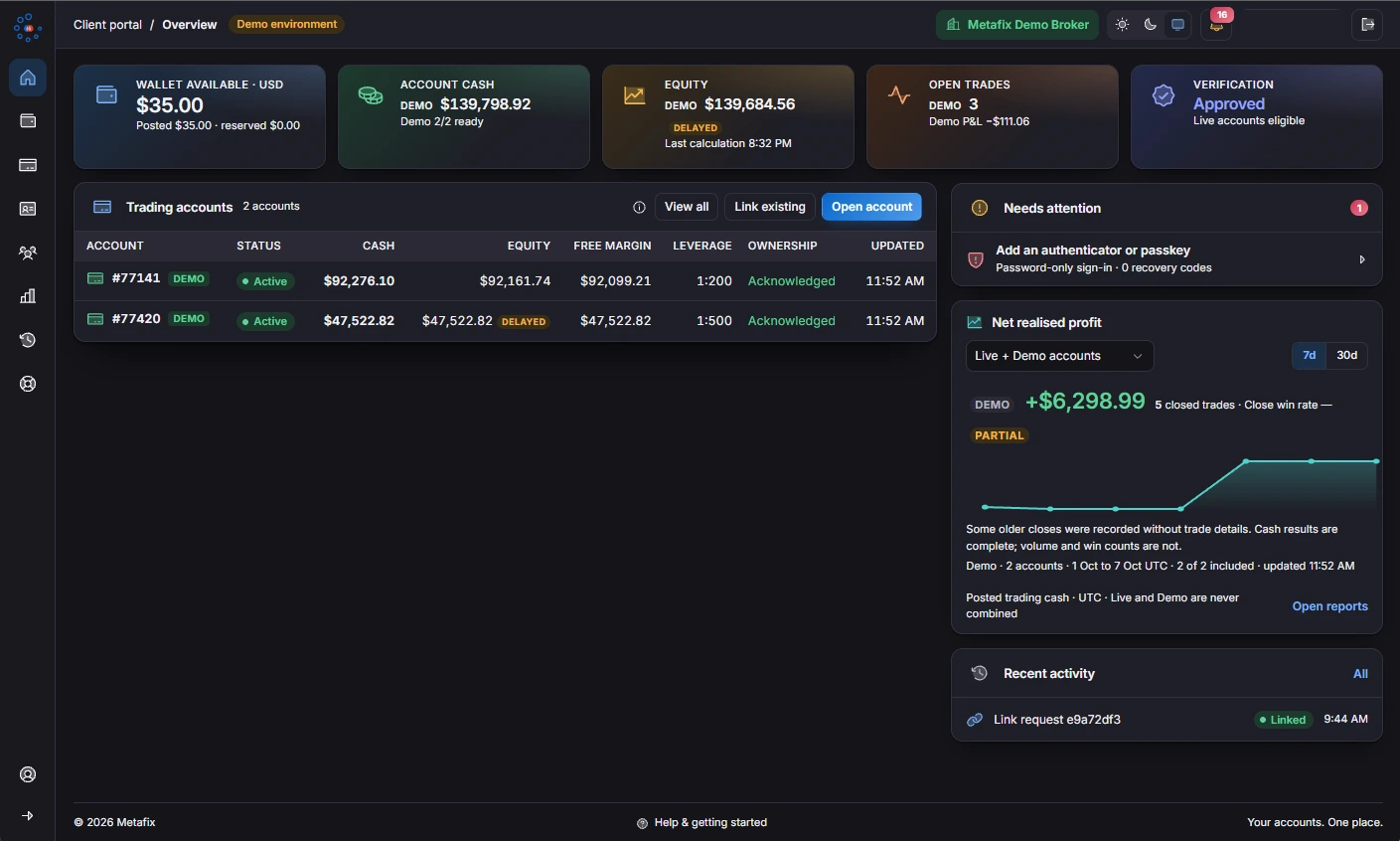
Metafix client portal showing the main wallet, trading accounts and verification status
  • KYCID, address and selfie review
  • IBMulti-level partner trees
  • 2FAAuthenticator sign-in
  • OneClient directory in Cockpit
  • Actual client portal in a demo environment. Figures shown are illustrative.
Two sides of one relationship

Self-service for clients. Context for your team.

Client self-service connects directly to the broker’s CRM and trading infrastructure, with the available choices controlled in Cockpit.

For clients

The client portal

  • Every account in one placeSee demo and live accounts side by side, with balances and status. The main wallet is shown separately from trading-account balances.
  • Verification with a clear outcomeSubmit ID, proof of address and a selfie in the portal. See the broker’s verification decision and stated reason.
  • Choose a broker-configured accountOpen an account from the broker’s products, with practice funds for demo accounts and a choice of enabled leverage settings.
  • Keep existing account numbersLink existing accounts after proving ownership. Account numbers are retained.
  • Self-service without a support callManage passwords, leverage requests and bot API keys from the portal.
For your team

The CRM in Cockpit

  • One client directorySee linked accounts, main-wallet balances and pending approvals together. Brand records remain separate even when the same email registers with two brands.
  • Assisted onboardingCreate a client, send a login-setup email and assign existing accounts from Cockpit.
  • Reasons on every decisionRecord KYC and leverage decisions with reasons shown to the client and retained in the audit trail.
  • A connected service deskReply to support tickets, review documents and approve deposits in Cockpit, with two-factor checks on money actions.
Explore Cockpit
The client journey

From registration to referral.

  1. 01Register with verified email
  2. 02Verify identity and address
  3. 03Open demo or live accounts
  4. 04Fund the main wallet
  5. 05Trade across Metafix apps
  6. 06Apply to refer clients
Money, support & security

A central place for the next step.

Main wallet and deposits

Fund the main wallet by bank transfer and track a deposit from review through to credit. The wallet provides a separate view of funds before allocation to a trading account.

Rolling outTransfers and withdrawals between the main wallet and live trading accounts. Confirm availability for your deployment.

Support and notifications

Open support tickets with attachments and follow messages in the notification inbox, alongside the rest of the client relationship.

A separate, protected login

The portal password is separate from the trading password. Two-factor sign-in uses an authenticator app, with recovery codes for account access.

The main wallet is separate from trading margin.Wallet funds do not count as account margin. Trading-account losses do not draw on the separate main-wallet balance. Brand-specific client records remain separate, including when one email is used with two brands.
Multi-level IB programme

Partners, referrals and a clear approval path.

Apply to the partner programme, create referral links and follow a direct team and full downline from the same login.

Partner tree

Build the hierarchy

Clients apply to become partners. Approve with a reason, assign a parent and set the permitted depth of the tree.

Referral links

Connect each introduction

Partners create referral links. Referred registrations remain linked to the partner, who can follow direct teams and the full downline.

Rolling out

Commission and settlement

Per-level commission plans and settlement of approved earnings into the partner’s main wallet. Confirm rollout availability for your deployment.

Configured in Cockpit

You decide what clients can do.

Payment integrations and available methods are configured for each deployment. Dedicated iOS and Android client-portal apps are rolling out; the browser portal is available today, separate from the live Metafix Trader apps.

Explore Cockpit
  • Account products and leverageSet account products, leverage ranges and demo balances. The portal offers only the choices enabled by the broker.
  • Payment methodsChoose the payment methods available to clients, configured for each deployment.
  • Partner approvalDecide who joins the partner programme and how deep the tree can go.
  • AI and automation accessConfigure AI access and usage limits, automated-trading permissions, available bots and news sources.
What it provides

Built into your brokerage workflow.

  1. 01Lead management and onboarding
  2. 02KYC review and approval
  3. 03IB, affiliate and referral management
  4. 04Payments and transaction history
Connected by design
  1. 1
    LeadRegistrations and leads arrive in the client directory.
  2. 2
    KYC reviewDocuments are reviewed with a recorded decision and reason.
  3. 3
    Funded accountDeposits are approved and accounts opened.
  4. 4
    Partner & payment historyReferrals and transactions stay on the record.
Talk to Metafix

Explore CRM & Client Portal for your business

Discuss the modules, execution model and dedicated deployment that fit your business.

Request a demo